Showing posts with label review. Show all posts

Saturday, May 7, 2016

Why use Hike messenger instead of other messaging?

Hike

In past few years, Messengers are used more than a local messaging app. The reason behind this popularity is; we can send as many messages to anyone or number of peoples at the same time in smallest sum of currency. WhatsApp takes the first place in messenger’s race. It is used most of the countries around the world. But now we have a rightful competitor. The hike is also a messaging app but with more amazing features than WhatsApp. If you are bored with WhatsApp then give a try to Hike and you won’t regret it.

You get all the features like your old messaging app most likely WhatsApp. Unlike WhatsApp, you can only chat with those who are present into your contacts or those who contacted you. You can find all the same emojis which are present in your WhatsApp messaging app. So you can have the same old messaging experience.

Here are the few things which differentiate Hike from other messengers.

Hike Stickers.

One of the amazing features which you will discover is Hike Stickers. You don’t have to write your message if you can communicate with expressions. These stickers will allow a user to send their message with your emotions. There are several stickers for every mood and occasion. Many more stickers are added every day.


Hike Direct 

I bet, your old Messenger won’t allow you to chat with your friend or share movies, music or pictures without any internet connection. This feature uses the same technique which is used by Shareit to join two mobile devices with the help of Wi-Fi hotspot.

Hidden Chat

This feature will always come handy when you want to hide any chat with your parents, girlfriend, and siblings. To use this feature you just have to tap on the Hike logo and then a screen will open in which you have to draw your pattern to unlock your secret chats.

Timeline

Unlike Facebook, you can also post your status and share them with your Hike contacts. All the status updates will be displayed on the Timeline. If you like that status update, then you can tap on that heart shaped icon by which you can show other contacts that you liked that status and it will be shared with other contacts automatically. If you chat with any contact very frequently then you can add that contact to your favorite list. So, next time you can easily find them.


Games and News

These two are the most used common features. When you get bored with just chatting or you got some spare time then you can use the Games feature to change your mood. Games are recently launched feature which gives you some old games which were famous before the smartphone era. Games like Snake, Word Rush, Sudoku, Chess and Solitaire are available to play.

News is another feature which gives you the recent news updates. At first, you will get all types of news updates but with time, the algorithm will give this feature a power by which it will only show those news updates which you were interested. Like I always check news which is related to technology, video games, and sports then after one week I get all the news updates on only those three topics. Those news articles were picked from famous news sites.

Natasha

No, this the neither the same Natasha present in your contact nor the Natasha from avengers. This is an A.I. which is developed for those who have a low number of contacts or just want to talk to a computer. I must say it is very powerful A.I. with a very great response and it is very human like. Just give it a try and you will find another friend in your contacts.

There are more features which make this messenger different from others. Like Cricket news updates for cricket geeks, Laugh which will give a daily dose of laughter and more.

I hope this will give you the courage to try this app instead of using your old messaging app. Till then don’t forget to share this with your contacts or friends. Keep visiting for more amazing updates. Like BGs Facebook page or find me on Google+, Instagram, and Twitter.

Tuesday, December 8, 2015

Top 5 selfie smart phones under 10000 rupees 2015.


I know we all are living in a world where we use our smart phones to take a pic of our best moments with ourselves in it. And day by day we are increasing mega pixel or “power” of our camera lens whether it is rear or front. About 80 percent of the population purchase smart phone because it has a great camera. For those selfie lovers mobile companies are very much ready. There are top 5 selfie smart phones with has great camera but they are also in your budgets and belong to very reputed companies of this field.


 1. Micromax YU yureka+ (8999Rs)
This one of the deals you were looking for, because this phone have a pretty decent specs and have 4208X3120p with 13 MP rear camera and have 5 MP front camera which works great in daylight. We can shoot full HD videos at 30fps with the rear camera. It got powerful LED flash by which we can have better low light pictures. We also capture things in slow motion videos.  It got 2Gigs of DDR3 RAM and 64 bit processor with 2500 mAh battery which a good thing, the major drawback is its Operating system KitKat but it is not that much. It also got the cyanogen which gives us the power to root our devices without any problems like it doesn’t void your warranty.


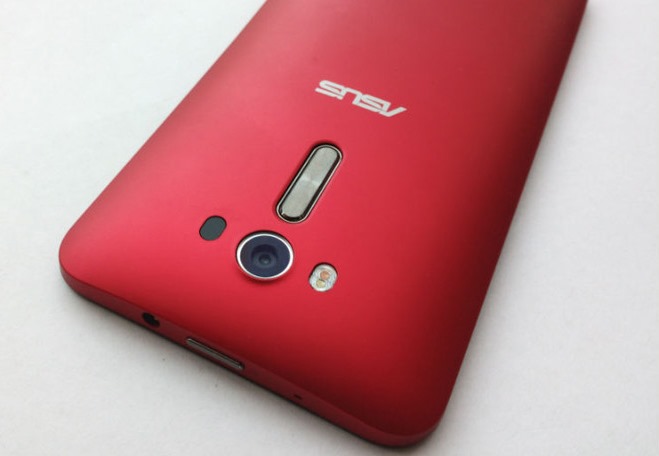
 2. ASUS Zenphone 2 Laser (9999Rs)
As we all know ASUS was doing great though out the year. It also gets the chance to get into this list or any other which have the same heading. It also has 5 MP. The name says it all, it name have a word “Laser” because its camera have a laser which help it to get best auto focus in this range of money. It can focus in .4 sec and give you the best focused picture quality. Beside the camera it got 5.5” HD screen, 2Gigs of RAM, 16 GB internal memory and 3000 mAh battery which hold it for a long time.


3.Huawei  Honor 4x (9999Rs)
It is a brand which has some potential to overpower some smartphone companies. It’s Honor 4x have 5MP front and 13MP rear camera as trended in this price range. You can shoot 720por Basic HD videos with it. The UHD videos can be captured with rear camera with 4208X3120p. It have also got LED flash and auto-focus but we can also use Geotagging after capturing pics, touch focus, HDR facility, face detection, and panorama capture feature. It comes with 2 Gigs of RAM, 8 GB internal memory, and Quad core 1.2 GHz processor. It has Android Lollipop version and KitKat version both, with its own launcher. It is pretty slim.       


4. Microsoft Lumia 540 (9000Rs)
Microsoft Lumia loved for its hardware, hated for the software. But it is now want to come back with its most recent operating system Windows 10. The hardware quality is premium because it is made by Nokia (and the name is enough or to know more ask your mommy). This phone has 5 MP camera in front and 8 on rear. It got 5” of display which can play basic HD videos. We can capture 480p videos with our selfie camera. It got 1Gigs of RAM, 8GB internal memory with LED flash. It runs Windows 8.1 with Lumia Denim. 1.2 GHz Quad-core processor. And if you are looking for a smart phone which needs replacement in a long time (as per hardware) you should check it out. And for more information about Windows 10 click Here.


5.InFocus M350(6999Rs)
InFocus is a company which gives a great budget phone for the selfie lovers. They have introduced M350 with 8MP rear and 8MP front. We can capture videos with ourselves in them with 1280X720 (Basic HD videos). It got 2Gigs of RAM with 5” display that can play HD movies. 1.5 GHz processor and 16GB internal memory. To handle all these hardware it uses 2500 mAh juice. This phone is worth of trying.


I hope this article will help you to get your budget phone and leave a comment down which phone will you purchase.
  
You can follow me on Google, Twitter, Facebook, and Instagram by clicking on It.

Monday, November 30, 2015

Microsoft Launched Lumia work as computer with new windows 10.


As per the last post, Microsoft launched their newest and better phones, last day in India Microsoft introduced Lumia 950 and Lumia 950 XL. It will be available commercially by the date 11 December 2k15. This device contain better camera, better processor with processing speed, powerful battery backup and much more new features. Continuum feature is the feature by which you can use your smart phone as Desktop.

If you didn’t read that last post click here.

We all are listening rumors about these smartphone till last week of September.  And the fact with this launch is; this smart phone is launched primarily in India. This Windows phone contains Cortana the personal assistant. By which you can search by your voice. It is very much similar to the google search app but the different search engine. This is also one of the features which give us the nearby feeling of our computer. 

Those are the things which are software level. Now just peek in hardware level, because we all want great hardware.

Microsoft Lumia 950 contains QUALCOM snapdragon 808 chipset. And for us to perform multi-tasking smoothly they have 64 bit cortex A-53processor.  Both smartphones contain 3 Gigs of RAM and with 32 Gigs of internal storage. As you will be thinking the only difference between these is screen size but no; it is also different as per processing speed and chipset. Lumia 950 XL contains QUALCOM 810 chipset which is better than Lumia 950 with 2 GHz Cortex A-57. And for the better graphics support it got Adreno 430 GPU.

Both smart-phones are same in camera quality both can shoot our videos in 4k resolution with 20 MP rear cameras and you can take clear selfie with 5 MP front cameras.  Both phones contain F/1.9 camera feature. There are 3 LED RGB flash. As per Lumia specialty we have a different button for clicking pictures. It also contain adaptive antenna by which we don’t have to face connectivity problems.

One of the feature that NOKIA always give in their phone whether it was GSM or Smart, the removable battery we all will get this feature with this smart phone also. It contains Type-C USB charging port by which you don’t have to worry about the parallel –ness of the porta and charger or USB pin. It no doubt increases the transfer speed but company claims to give you fast charging, by fast charging we will be able to charge our Lumia 950 and 950 XL 50% in just half an hour.

Now let’s get back to some other awesome features.

One drive will play a very important role in this smart phone. It will help you to sync many documents with other devices “which it already does”. Windows 10 will upload every photo to cloud and make albums by itself; I hope their will on and off option for this. But with this feature you can access same photos with “n” windows devices in same time.

Lumia doesn’t stop till one drive and cloud they give you Hello Biometric feature by which we can unlock our devices with our faces (hopefully we can use some of our funny faces for the lock). And as early stated the Continuum feature with we can use Microsoft Display Dock, which contain one HDMI and three USB ports. And we can operate our phone with computer.

As per browsers they have Spartan browser, which is debuting on Windows 10 platform. It will increase the internet surfing speed by features given in this browser and there are many other features which will amaze you. And return of the mighty start button with a twist. In windows 8 we don’t like that tile view for pcs but in smartphones it was pretty good, so they don’t remove that but made it customizable.

And now it’s time for overview. So here it is.

Phone will easily connect with pc.
Spartan browser will change your browsing experience.
PowerPoint will work on this device like pc.
Never hang (the company claims that device will never hang.)
New amazing features.
Microsoft’s Outlook with new awesome features.
Use Skype messenger as your primary message app.
Apps like Instagram, G-mail will work easily.                                    

You can follow me on Google, Twitter, Facebook, and Instagram by clicking on It.

Tuesday, October 27, 2015

Paid reviews are not worth it.

Hello purchasers, at a point we all purchase gadgets, books, hotel rooms, etc., by reading opinions of other people who used that product. But sometime you get tricked by paid reviews. Now you will think what are paidreviews?

Here is your answer. Paid reviews are those reviews which are given by people like great writers, critics and normal people who just want money .Company pay them to write appealing reviews about their products.

So, those who purchase products by reading reviews can easily trust them and buy their products. But in my opinion don’t trust all reviews and don’t ignore all reviews, follow those reviews which you think are genuine. And try to test the product and make your own review.

NOTE: Don’t waste money just because the review said it is a great product. Or ignore product because it says worst product ever.

There are many more things like paid reviews phishing, false advertisement and wrong data. I know you will wonder now what these terms are.

Phishing

This somehow very similar to real life fishing, they use some fake e-mails as bait and you are the fish here. In phishing you the person get an e-mail, text or any other type of message that he/she won a big amount, or product for free or through some lottery, then they will request the person to send his/her personal details like Name, address, phone numbers or even your bank account number to claim his/her prize. Once the person contacts them (the fish is in the net.) Then they will ask for small amount of money to pass the “shipping charges” or any other any “legal formalities”. When person paid the price there is nothing can bring the money which is given by the person himself. Here is an example e-mail.

False Advertisement

It is another technique to lose your money. Some advertisement tells you more than enough about the product; use your resources to get more information about that product. If you spent more time on internet you surely faced a false advertisement that tells you to click here to win money or your computer running slow please click here. Once you clicked that a pop-up window open or any software starts to download. If you open that software it can be a malware or Trojan horse virus which can delete corrupt and even crash your computer. So, keep your eyes open for that. Or when you open that popped-up window you are directed to a shopping site.

Wrong data        

Remember everything on internet is not true. Even Wikipedia make mistakes because there are articles are written by people like me and you. And sometimes we can be wrong from actual figures. Try to use the real resources as much as possible.


I hope next time you will be aware of these things and help your friends by sharing this post.


You can follow me on Google, Twitter, Facebook, and Instagram by clicking on them.

Friday, May 23, 2014

Review : Dark Souls 2

 How much of your humanity are you willing to give up for even the slightest chance of victory?
Dark Souls II asks this question of you at every turn, encouraging you to press onward in spite of imminent death. And with each death, you lose a little of your humanity and become more hollow. Your maximum health slightly diminishes each time as well, eventually sinking to 50 percent of its full value, and yet as each sliver of humanity is sliced away, you heed the call to move onward. Eventually, you overcome the obstacle that stood between you and victory--that quartet of gargoyles swarming you on a rooftop, that arachnoid demon plunging poisonous pincers into your flesh, that disgusting mound of meat that defies description. You have triumphed! But your gain does not come without sacrifice. You have sworn, you have gasped, and you have sweated. You have forfeited your own humanity so you might collect the souls of the damned.
Like Dark Souls and Demon's Souls before it, Dark Souls II is not just a fantasy role-playing adventure, but a cloud that hangs heavy over your head whenever you so much as think about it. These modern classics developed by From Software have rightfully earned a reputation for being brutally difficult, but their beauty is derived not solely from difficulty, but also from dread. Dark Souls II is not a survival horror game in the normal sense, but few games can make you this afraid to peer around the corner, while simultaneously curious as to what awaits you there. Death is so very beautiful in this game, for it comes at the hands of amazing beasts and warmongers: hulking armored knights, shimmering otherworldly invaders, and tendrils that rise out of black pools of poison. Sure, each death punctures your heart, but one of Dark Souls II's many gruesome pleasures is discovering new ways to die.
The eerie blackness is front and center as you start up the game and enter the mysterious abode in front of you. Three old crones await you inside and ask you to customize your character and choose a class before venturing into the unknown. Like most of Dark Souls II's characters, these women offer vague advice and refer to events and concepts without filling in the details. The anxiety mounts as you weave in and out of the nearby caverns that fill you in on the basics of movement and combat. This area may teach you the fundamentals, but it also raises a number of questions. What are those odd voices you hear when you stand near the bird's nest that rests on a narrow ledge? What is the significance of the flame sconces scattered about that you are meant to set alight? How do you survive encounters with the monstrous ogres on the beach below that squish you like a measly bug when you draw near?
Welcome to Drangleic, a world that is not quick to whisper its secrets to you, in a game that trusts you to find the answers for yourself.
This introduction is not as soul crushing as the original Dark Souls' opening, but that's just fine, for Dark Souls II offers you an early taste of hope, a feeling that was quite rare in its predecessors. That hope arrives by way of Majula, a gorgeous oasis that's as close to a home as you will find in the game. My first glimpse of Majula was a revelation. As I emerged from the nearby shadows, the glowing sun blinded me, and I stood in awe of the world opening up before me. Whenever the bleakness of Drangleic at large overwhelmed me, I was glad to return to this hub for an emotional refresh.
Majula is more akin to Demon's Souls' Nexus than to Dark Souls' Firelink Shrine. It is your central hub of operations, and while it's mostly devoid of life when you first come upon it, it slowly fills out with the vendors you meet upon your travels, many of whom set up shop there. Your most important contact there, however, is the cloaked woman who allows you to level up in exchange for souls, the game's currency. But even Majula is not immune to mystery. There's an impossibly deep hole in the ground here, one that spells certain death if you fall into it. (Don't let it fool you; the boards that crisscross this passage may look high enough to provide a safe landing, but you will not survive that fall.) What's down there? Surely something valuable must lurk down there. Or something horrifying. You eventually make your way down, but Dark Souls II doesn't tell you when or how that may happen.
Instead, Dark Souls II trusts you. As in its predecessors, there are no waypoints, and there is no quest log. Instead, you simply head out into Drangleic seeking to light primal bonfires and thus restore some dignity to this decrepit land. The only way to defeat the defiant creatures that guard the bonfires, however, is to grow stronger by murdering enemies and collecting their souls, which you then spend on new levels, new armor, and other trinkets that strengthen your resolve in battle. If you've played the earlier Souls games, you should take to the combat quickly. You feel each swing of your axe, each stab with your spear, and each fireball you lob. Timing is key: every action leaves you vulnerable, so you must pay close attention to the rhythm of your enemies' attacks and strike at the opportune moment. Managing your stamina is also vital to success. Every attack you launch uses up stamina, as does successfully blocking an attack. You can't simply flail about with abandon; this is not that kind of game, and not taking care during every encounter will get you killed.
Not that you shouldn't expect death. Dark Souls II is built around your repeated demise. When that inevitable moment comes, you drop all the souls you were carrying and must retrieve them if you don't want to lose them permanently. You get only one chance to get them back, for dying before you reach them eliminates them from the world forever. Of course, this mechanic is nothing new: it's the same concept that powered both Demon's Souls and Dark Souls, after all. But just as Dark Souls represented a structural change over Demon's Souls, so too does Dark Souls II over its predecessor.
Some of the differences are noticeable early on, though their benefits aren't always immediately clear. I was not sure how I felt about one such change: the limited enemy respawns. Each time you die or rest at a bonfire, the world is refreshed and the standard defeated foes respawn. Or at least, that's how it used to happen. In Dark Souls II, there comes a point when many local enemies don't respawn anymore, allowing you freedom to progress with fewer obstacles in your way. It's true that infinite respawns encouraged grinding, particularly when the enemies you faced dropped important items. But that repetition also instilled a bizarre connection between player and game. I can still clearly remember, for instance, exactly how to progress through Dark Souls' Undead Parish--where each enemy is, what attacks it will use, and what precarious drop-offs I must keep a lookout for. When I first encountered the limited respawn system, I worried that the sequel had lost a vital element that would keep Dark Souls II from commandeering my waking and sleeping thoughts.
As it turns out, I shouldn't have worried. The grinding opportunities are still there, and there are in-game items that force enemies in a given region to begin respawning again (and make them more powerful, to boot). Dark Souls II's hook isn't the endless cycle of enemy death and resurrection, however, but the promise of new and exciting places to explore, and new and exciting foes to face. And that hook is supported by any number of subtle changes to the formula. For example, once you activate a bonfire, you can warp to it from any other bonfire without having to pass through perilous places over and over again. Again, I didn't immediately take to this change, but once I discovered just how vast Drangleic was--it's decidedly bigger than Dark Souls' Lordran--I embraced the structural tweaks.
These changes might not have worked had Dark Souls II not made discovery such a thrill, but with each new area comes a new wondrous vista and a new challenge to overcome. The early forests and ruins are very Dark Souls, but the intricate architecture and carefully planned enemy locations make even familiar-looking environments fresh and unique. The more progress you make, however, the more unusual the settings become, and the more you need to consider new methods of approach. Suddenly, undead freaks are flinging themselves to the ground and exploding, and so you must hasten your rhythm. You walk through an archway and into the thickest fog imaginable, where you cannot lock on to the ghostly shimmers that attack you. Poison rains from the sky, bedeviled urns curse you when you linger near, and anthropomorphic tortoises stop, drop, and roll all over your puny body. Dark Souls II wants to kill you, but the cycle of death and rebirth is worth it if it means finding the royal ring that lets you open that giant door and discover what new and wonderful lands lie beyond it.
Those lands are incredibly striking. Given reports of Dark Souls II's new engine, I was disappointed by the game's lighting, which was flatter than I had hoped, thus rendering my torch less vital for providing dynamic light than it might have otherwise been. But to fixate for too long on this single visual element sells the fantastic art design short. Make your way past Harvest Valley's poisonous pools--and the fantastic monstrosities that fire orbs of darkness at you--and you can only marvel at all of the windmills that lie before you. Of course, this is Drangleic and not the Netherlands; those windmills are not quaint landmarks, but harbingers of disease and death. Then there's Iron Keep, which takes lava levels to a whole new height of fiery doom. There are very occasional frame rate issues that intrude on the grim elegance, but nothing on par with Dark Souls' Blighttown struggles.

Don't forget to comment down.

Saturday, February 1, 2014

History of Tekken


Hello Tkkeners we all know that tekken is an awesome game since 1994 and for those who want to know more about tekken here is the list of tekken games scince 1994 and the video tells all. So watch it share it and like and comment it.

1. Tekken (1994)
2. Tekken 2 (1995)
3. Tekken Card Challenge (1997)
4. Tekken 3 (1997)
5. Tekken Tag Tournament (1999)
6. Tekken 4 (2000)
7. Tekken Advance (2001)
8. Tekken 5 (2004)
9. Death by Degrees (2005)
10. Tekken: Dark Resurrection (2005)
11. Tekken 6 (2007)
12. Tekken 6: Bloodline Rebellion (2008)
13. Tekken Resolute (2010)
14. Tekken Bowl (2011)
15. Tekken Hybrid (2011)
16. Tekken 3D Prime Edition (2012)
17. Street Fighter X Tekken (2012)
18. Tekken Tag Tournament 2 (2012)
19. Tekken Card Tournament (2013)
20. Tekken Revolution (2013)
21. Tekken X Street Fighter (?)

22. Tekken Ball.


Comment if i had forget any Tekken game.


Sunday, January 19, 2014

Samsung Galaxy NotePRO 12.2 Preview

Samsung Galaxy NotePRO 12.2 PreviewIntroduction


There might come a time in a person's life when they ask themselves how have they remained productive so far without a 12" stylus-wielding tablet with extremely high resolution display. That's precisely the moment Samsung is betting on when it introduced the Galaxy NotePRO - the largest member of its Note family, that arguably started the whole big-screen mobile device swoop with the introduction of the first phablet. 

Samsung argues that the 12.2” NotePRO offers PC-like productivity in today's mobile age that blurs the lines between computing device segments, and if we look at the specs of this Android tablet, the company has a point, so let's preview what will be on offer with the newcomer in the Note portfolio, taking some hints from our prototype unit.

Design

Samsung Galaxy NotePRO 12.2 Preview
Samsung has used the artificial leather look with stitching accents pioneered with the Note 3 once again. It arguably gives its electronic devices a more buttoned-down and sophisticated look than sheer plastic, and we have to say you can be fooled it is a leather notepad looking from afar. It is still plastic, but nicer to the touch than the usual glossy coat. Glossy, however, is offering more traction for your hands, as it just sticks to your fingers, whereas the leathery back here is more slippery. There is a metallic-looking rim surrounding the sides of the NotePRO, further adding to the more premium looks.
Samsung Galaxy NotePRO 12.2 Preview
Despite the elevated leather pattern with edge stitches, though, the tablet manages to stay in the sub-8mm category, which is where all the catwalk stars of the tablet arena belong, too. The exact dimensions are 11.64 x 8.03 x 0.31 inches (295.6 x 204 x 7.95 mm), and we'd say this is as compact as a 12-incher can get, while still leaving some bezel on the side for resting your thumbs during handling. For comparison, one of the closest competitors - the Sony Vaio Tap 11 - sports an 11" screen, and measures more at 12" x 7.40" x 0.39".

The issue here is weight, though - at 26.56 oz (753 g), Samsung's largest tablet isn't feathery to carry around, or keep in your hand for a long time. Sony's Tap 11 weighs about the same, but it carries an Intel Haswell processor with the respective fan, powering full desktop-grade Windows 8.1, plus a full USB 3.0 port. When you tack on keyboard folios, like the one Logitech introduced for the NotePRO, and you start thinking about ultra thin and light laptops, like Sony's Vaio Pro 11, which carry much more oomph than Samsung's tablet with this setup. 

Thankfully, we get Samsung's excellent S Pen stylus with the NotePRO, which sits tucked neatly in a silo at the top right corner of the slate, ready to alternate your productivity urges with doodling sprees. It is very easy to take out or push back in, yet feels snug and not wobbly in the silo.


Interface and functionality


The tablet ships with the newest Android 4.4 KitKat, but Samsung's TouchWiz Nature UX interface we are accustomed to, has been given a fresh coat of paint. So fresh, in fact, that it has received a different moniker – Magazine UX – indicating a brand new tablet-oriented interface that Samsung argues is mimicking the layout of traditional magazines we are accustomed to ruffling through.


Processor and memory


Depending on whether you want LTE connectivity with your Galaxy NotePRO or not, the tablet ships with two different chipsets. One is the new "true octa-core" 1.9 GHz Exynos 5 Octa, which can have all eight cores firing up at once, pushing those four sections of the Multi Window mode with ease, even when a Pen Window or two are running on top with more apps active inside. The LTE version will come with the no less powerful quad-core Snapdragon 800, clocked at the respectable 2.3 GHz.


Internet and Connectivity


We already mentioned that there will be an Exynos 5 Octa version of the NotePRO, which will be Wi-Fi-only, or carry an HSPA+ radio with up to 21 Mbps download speeds. The NotePRO version with Snapdragon processor will be able to get on your carrier's fast 4G LTE network. The HSPA+ model will cover the global 850/900/1900/2100 MHz bands, whereas the LTE one will hop on the 800/900/1800/2600+850/2100 bands, which seem geared towards Europe and Asia, so US carrier versions of the tablet might come at a later date.

Camera


The 8 MP camera on the rear of the NotePRO is of the auto focus variety, and comes accompanied by an LED Flash. Featuring zero shutter lag, it takes advantage of the numerous shooting and scene modes the typical Samsung camera interface offers, such as Panorama, HDR, Sports, Night and so on. You also get a 2 MP front-facing shooter, which does 720p video recording, whereas the rear one is capable of 1080p footage. We are providing some camera samples below, but will comment on the quality when the final retail version of the tablet is here.


Multimedia


The gallery offers a split-screen view with folders on the left, and their content shown in grid preview on the right. The tablet offers very rich editing options, which are enhanced with stylus-friendly features to draw and annotate on your photos. 

Your tunes catalog is also getting a split-screen view in the music player, with categories like artists, albums and playlists on the left, and content on the right. The NotePRO has a number of sound modes and equalizer presets, and the two stereo speakers on the sides are quite powerful.

1080p videos in all popular formats can be played without a hitch, and look beautiful on the huge and luminant high-res display, so watching movies or other footage would be one of the selling points of this tablet.

Battery


With a 9500 mAh, Samsung's Galaxy NotePRO is quoted to last 10 hours of video playback on a charge, which is above average for an Android slate, so you can rest assured it will get you through a whole day at the office or on the go when you are away from a charger. We will know how it stacks against the competition when we put the retail unit through our battery benchmark testing procedure.

Saturday, August 31, 2013

Payday 2 Review

The Good

  • Captures the drama and satisfaction of daring heists
  •   
  •  
  • New skills enable new tactics
  •    
  • Element of randomness keeps you on your toes.

The Bad

  • Some randomness is due to bugs 
  •   
  • Reward pipeline is problematic 
  •   
  • Friendly AI is all but useless.
In crime, as in game development, things don't always go as planned. A suspicious passerby might call the cops in early, and then those cops might phase through a wall. The loot you expect to find might not be there, and the end-of-heist reward you're hoping for might never arrive. Civilians might try to flee in the middle of a firefight, or they might disappear through the floor. And yet, despite the potential pitfalls and the actual flaws of Payday 2, things have a way of coming together. The tension of planning and keeping things quiet, the excitement of asserting control when all hell breaks loose, and the satisfaction of a successful score outshine any dull spots, making Payday 2 an immensely enjoyable way to team up for a life of crime.
As part of the four-man crew of Hoxton, Chains, Dallas, and Wolf, you are contracted to do jobs by a dude named Bain. He sets you up with various shady characters and presents you with a city map of constantly changing opportunities. There are around 10 distinct jobs that pop up regularly with varying difficulty levels that affect how hard and how lucrative they will be. Some are stand-alone gigs, like bank heists, store robberies, and nightclub burglaries, while others span multiple days and involve stealing art, cooking meth, transporting drugs, dealing with gang members, and stealing from senators.
Mission objectives are generally clear, though there are a number of subtleties to contend with as well. Some challenges can be mastered by experience; it won't take you long to memorize the floor plan of the bank, and you quickly become familiar with the penalty for setting off alarms in the art gallery. Others require you to be flexible; cameras and security guards aren't always in the same place, and even doors, safes, and getaway spots can vary from mission to mission. This mix of constancy and variability does a great job of making you feel more confident with each mission while simultaneously keeping you on your toes. You can never be perfectly prepared for a job, and that's the way it should be.
Unfortunately, there are also some things that are more difficult to prepare for. Strange happenings with civilian and police character models, walls that you can pull solid objects through, and other technical oddities crop up throughout Payday 2. They usually have only minor effects on your criminal activity, but they do add a sour note to the otherwise welcome unpredictability. Such issues aren't likely to derail your heists, but they are occasionally enough to turn your stealthy infiltration into a messy affair.
Sometimes being a good teammate involves a lot of shotgunning.
Keeping things quiet is one of the biggest challenges of Payday 2 because so much can go wrong. A suspicious civilian might see you put on your mask. A security camera might spot you at a distance. A guard might round the corner when you're not expecting it. The guy on the radio might not believe you when you pretend to be the guard you just knocked out. Or someone, somewhere might hear the tinkling of broken glass, and before you know it, the cops are on their way and your escape van has bugged out. Completing a job without the cavalry showing up triggers a rush of giddy satisfaction, but more often than not, you're going to have to shoot your way out.
Once the alarm has sounded, the cops are on their way, but you can still manage the situation. Taking civilian hostages delays the armed escalation, keeping the really tough enemies at bay for a while. Moving your loot to a defensible position, closing the metal shutters on a store, or finding planks to board up a window can help you hold out while you wait for your drill or lock pick or computer hack to work its magic. Meanwhile, the cops come at you, and you gun them down in droves. The gunplay is solid and the AI is aggressive, but combat is more of a war of attrition than a contest of skill. Stick around long enough, and you will inevitably be overrun, no matter how skillfully you delay and fend off the advancing waves. On tougher jobs, there is more loot to grab than you can easily get away with, tempting you to try to hold out a bit longer to get a fatter payday. Get too greedy, however, and all is lost. Payday 2 channels this classic criminal conundrum nicely, right down to the heated mid-battle disagreements between team members

Wednesday, August 21, 2013

Google Nexus 7 Review (2013)

Google Nexus 7 Review (2013)


Design:

Commissioned yet again for the task at hand, Taiwan based company Asus has done yet another marvelous job designing the 2013 version of the Google Nexus 7. Simply, it has all the qualities we want to find in a successive device, as it’s both thinner (0.34”) in frame and lighter (10.55 oz) in weight to make it even easier to grasp with a single hand. We’ll admit, the design isn’t the most captivating over other shakers in the space, since it follows the same modest design structure as before, which is most notable for its subtle tapered edges, cleaner looking soft touch rear casing, and skinnier left/right bezels. It’s a minimalist design at its core, a defining characteristic for sure, but it doesn’t compromise with its construction either. Sure, it’s not flaunting a premium design like the iPad mini, but it really doesn’t need to, mainly because the updated design has an endearing effect on its own. 


Design:

Commissioned yet again for the task at hand, Taiwan based company Asus has done yet another marvelous job designing the 2013 version of the Google Nexus 7. Simply, it has all the qualities we want to find in a successive device, as it’s both thinner (0.34”) in frame and lighter (10.55 oz) in weight to make it even easier to grasp with a single hand. We’ll admit, the design isn’t the most captivating over other shakers in the space, since it follows the same modest design structure as before, which is most notable for its subtle tapered edges, cleaner looking soft touch rear casing, and skinnier left/right bezels. It’s a minimalist design at its core, a defining characteristic for sure, but it doesn’t compromise with its construction either. Sure, it’s not flaunting a premium design like the iPad mini, but it really doesn’t need to, mainly because the updated design has an endearing effect on its own. 

With the minimalist design and all, the tablet’s façade is pretty clean looking, since the usual set of Android capacitive buttons are incorporated into the interface. However, there’s a single LED light that pulsates in white for notifications – while a front-facing 1.2-megapixel camera, enabled for 720 video recording, is perched in an offset position toward the upper right corner above the display.

Just as before, the right edge of the tablet is home to its physical power button and volume control – with each offering better feel and responsiveness than last year’s model. Furthermore, the microphone is also found on the same side as well. Up top, the only item we find is the 3.5mm headset jack – while the microUSB port is the single item that’s seen on the bottom side. Interestingly, the new Nexus 7 features two speakers that are placed in close proximity to the top and bottom edges of the tablet when it’s held in portrait.

Adding more depth, the Nexus 7 is now armed with a rear camera – a 5-megapixel auto-focus one to be exact, that’s capable of recording video in 1080p. Although it’s not something we’d particularly use all the time, especially when we’re talking about a tablet here, it’s nonetheless a pleasing addition to use when the tablet is the only thing within reach to snap something on the fly.